You need to diagnose a customer's Windows machine, and today they send you an AnyDesk ID.
Eyes and hands for Claude on your customer's machine.
Golem gives Claude temporary, on-demand access to another Windows machine: run PowerShell, move files, look at the screen, manage services and talk to the MCP servers already running there. The agent is copied onto that machine, is not installed, and shuts itself down after 30 minutes with no requests. For diagnosing a customer's machine without going through AnyDesk.
Who it is for
Support technicians, with the customer's permission
People who maintain applications on other people's machines
Golem has no 30-day trial: without a license the client starts in evaluation mode, with the tools that look (files, processes, services, screenshots, logs) and one live connection at a time. The tools that act (PowerShell, stopping services, starting processes, writing files) need a license. No sign-up needed.
Convinced? Create an account to buy the license and download it from your portal.
Golem 1.6.0 Windows Claude Desktop and Claude Code Agent: one .exe, nothing to install Client: no administrator needed
Which one do I download?
Golem Assist and the server kit do the same job: they put the Golem agent on the computer that is going to be driven, and from the other side Claude works with it in exactly the same way. What changes is who starts it and how: Assist is a window with buttons, made for the person asking for help; the kit is a console, for someone at home with a .bat file.
For the person asking for help
Golem Assistversion 1.6.0
One window, one button and twelve digits
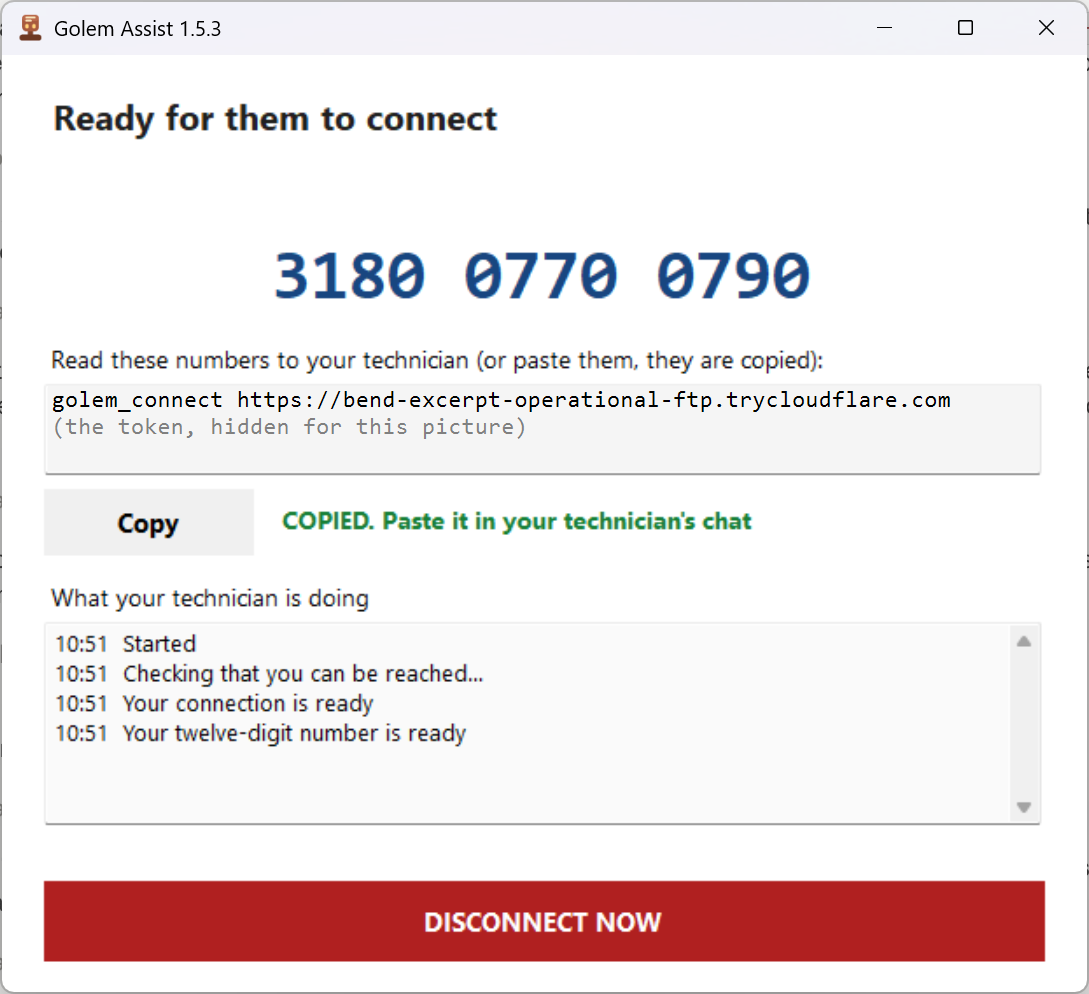
Golem Assist, once connected
The person in front of the computer opens it, with no computer knowledge needed.
It shows a twelve-digit number to read out on the phone; the technician types it into their client.
A red button cuts the connection instantly, and if nobody connects, it closes by itself.
A single signed file, or a version that installs and leaves a desktop shortcut.
It takes you to its page: the scam warning comes before the download.
For the technician or the administrator
Server kitversion 1.6.0
A console and a golem_connect line
C:\Golem\golem.exe─ ☐ ✕
  GOLEM 1.5.3   eyes and hands on SERVER-01
  ----------------------------------------------------------------
  machine    : SERVER-01 (Administrator)
  listening  : https://203.0.113.10:8797
  tools      : 27   (shell: powershell.exe)
  TLS        : a certificate of its own for this run

  Whoever gets this line controls this machine until you close this window.
  Paste this line into the chat:

golem_connect https://203.0.113.10:8797 ●●●●●●●● 1CE3184E…1F28AF8F

  ALREADY COPIED: just paste it (Ctrl+V) wherever you are asked to.
The agent's console on startup (trimmed, token hidden)
For servers, VPSs and machines you look after: double-click the right .bat, public IP or tunnel.
It prints a golem_connect line and copies it for you to paste into Claude's chat.
It takes options: look only (--read-only), your own scripts in scripts\ and the machine's MCP servers.
No installer: a zip with golem.exe, cloudflared.exe and the start-up .bat files.
And the client? That one goes on your computer, the one with Claude, and it is the only piece that needs a license. Assist and the server kit are free.
Features
PowerShell on the other machine
run_powershell with a timeout of up to 240 s, and long jobs in the background with wait, jobs and kill_job. A command that fails returns its exit_code: it is not mistaken for a broken tool.
Files between the two machines
golem_push and golem_pull move files and whole folders, backing up the destination first. snapshot takes the same copy on its own before anything is touched.
See the screen
screenshot and list_monitors. If the remote desktop was closed without signing out, reattach_console hands it back to the console and screenshots work again.
Services, processes and DLLs
service, start_process, kill_process and register_dll, which checks in the registry that the ProgId really showed up: regsvr32 /s stays silent even when it fails. And list_com tells you which COM DLLs the machine has, with their file, their bitness and whatever does not add up.
The MCP servers on that machine
Declare in golem.mcp.json an MCP server that already lives there (FoxAgent, for instance) and Golem starts it on launch and publishes its tools under its prefix.
Temporary and audited
A new token on every run, TLS with its own certificate or a Cloudflare tunnel, and a golem-audit.log with one line per call and per file moved, with no tokens.
Golem-Client-Setup leaves golem-client.exe in %LOCALAPPDATA%\Golem\ and registers the golem MCP server in Claude Desktop and in Claude Code, leaving whatever you already had alone. No administrator needed.
2
Your customer starts the agent
A double-click on the right .bat from the server kit: one for a machine with a public IP, and one, through a tunnel, for a PC behind a router. The agent prints a golem_connect line and has already copied it to the clipboard.
3
You paste the line into the chat
Claude connects to the agent and works on that machine, with the agent's tools and those of any MCP servers already there.
The tools, by where they live
19 in the agent, on the remote machine, and 7 in the client, next to Claude. On top of that, every .ps1 you leave in scripts\ and every tool of the MCP servers in golem.mcp.json.
For people who maintain applications on other people's machines
Today your customer sends you an AnyDesk ID. With Golem they double-click a .bat and send you a line. What changes is who is at the other end: Claude, with real tools and everything written down.
Not a permanent agent
No service, it does not start with Windows, the token changes on every run and the agent shuts down once it is no longer used. Without somebody there to launch it, there is no way in.
The agent is free
golem.exe carries no license: copy it to as many customer machines as you need. What you buy is the seat of the technician who connects.
With FoxAgent behind it
If your VFP ERP already uses FoxAgent, Golem starts it from golem.mcp.json and your technician sees its tools. Authorization stays where it was: in your application.
Your customer launches the agent and passes you a line. You paste it into Claude. When you are done, nothing is left open.
Who it is for, and who it is not for
Golem is for technicians who support Windows applications on their customers' machines, with the permission of the person in charge of each machine: someone there starts the agent and hands you the line.
It is not a surveillance or covert-access tool. Using it without that permission is prohibited by its specific terms, and anyone who does so loses their license.
What it already does today, in 1.6.0, with nothing to configure.
Nobody gets in unless someone opens from the inside
The agent is not installed, is not a service and does not start with Windows. Someone at that machine launches it with a double-click, sees the window and hands over the connection line. Without that line there is no session, and closing the window ends it.
You can see who is inside
The agent's window writes, with the time, who connects (the holder of their license) and when they leave, and the window title says so while the session lasts.
The log belongs to the customer
Every call is written to golem-audit.log on that machine, with the license of the technician who made it and without tokens. That file does not leave the machine.
Nothing goes through our servers
The connection is direct, or through a Cloudflare tunnel the customer sets up. We do not see sessions, commands or files, and the license is checked offline.
One token per launch
It changes every time the agent starts and is saved neither to disk nor to the log. By default the connection is encrypted with TLS: with its own certificate, whose fingerprint travels in the line, or with Cloudflare's in the tunnel.
It shuts itself down
After 30 minutes without requests (a running job or a service stopped by Golem postpones it, for up to 4 hours). If it opened a firewall rule, it removes it on the way out.
You can take its hands away
With --allow the agent publishes only the tools you permit: an agent that can only look is one launch line.
Signed binaries
golem.exe, golem-client.exe and the installer carry an Authenticode digital signature in the name of Irwin Alfredo Rodriguez Gimenez (an SSL.com certificate), with a timestamp. If the file's properties show an invalid signature or a different publisher, that file is not ours.
The server kit, free
It is what goes on the machine you want to drive: golem.exe, the two start-up .bat files (public IP or tunnel), their Spanish versions and cloudflared.exe, Cloudflare's official binary. It downloads with no account and no license, and you copy it wherever you need it.
Golem is digitally signed
Since 1.1.3, golem.exe (and cloudflared.exe, signed by Cloudflare) carry a publisher signature in the name of Irwin Alfredo Rodriguez Gimenez, with a timestamp. To see it: right-click the file → Properties → Digital Signatures, or run Get-AuthenticodeSignature in PowerShell, which must say Valid.
SmartScreen: the certificate is new and Windows may still warn for a while. If “Windows protected your PC” appears, click More info: it must say Publisher: Irwin Alfredo Rodriguez Gimenez. If it does, Run anyway; if it says “Unknown publisher”, that file is not ours: do not run it.
Remote administration tools: some antivirus products flag remote administration programs such as Golem by category, with nothing wrong in the file. If yours does, add the exclusion only after checking that the SHA-256 matches the one published below.
No account, no license. A .zip with golem.exe, the start-up .bat files and cloudflared.exe. Golem-Server-1.6.0.zip · 57.8 MB
Before you install
The server kit comes as a .zip. golem.exe is signed, but Windows marks what comes from the internet and, with a new certificate, may warn you when you launch it. Here is what you will see, how to continue, and how to check for yourself that the file you downloaded is exactly the one we published.
File downloaded from the internet, and SmartScreen
Windows marks the .zip as downloaded from the internet, and that mark passes on to every file you extract from it. If you launch golem.exe or one of the .bat files without unblocking first, SmartScreen appears (“Windows protected your PC”): the way out is two clicks, “More info” and “Run anyway”. To keep it from appearing, unblock the .zip before extracting it.
Right-click the .zip → Properties.
At the bottom, tick Unblock and confirm.
Extract after unblocking: the other way round, the mark stays on every extracted file.
You can also do it from PowerShell: Unblock-File on the downloaded .zip.
If your antivirus stops it
Some antivirus products quarantine executables they rarely see, and golem.exe opens a port and launches PowerShell, which is exactly what they watch for. If that happens, add an exclusion for the folder where you keep golem.exe (C:\Golem\, say) and launch it again.
If the antivirus belongs to your company and you cannot change its rules, give the SHA-256 below to whoever administers it: that is what they need to clear the file.
Check what you downloaded
These are the details of the current version, for the client installer and the server kit. Each hash is computed on the file exactly as it downloads:
If the value matches the table, the file is ours and intact. If it does not match, do not run it: download it again and, if it still does not match, write to soporte@irwinrodriguez.dev.
Hashes are measured again for every published version. If you downloaded an earlier version, its hash will not necessarily match this table.
Price
What is licensed is the client, golem-client.exe: per technician or per team. Every tool and several connections at once in every tier, and the agent on the other machines is free.
1 technician: the license is bound to their machine. From Team 3 up it is a company license: the company is the holder, it is not bound to any machine and the number of technicians is contractual: Golem does not phone home or count seats.
One-time payment with 12 months of updates. After that year the license keeps working with the versions inside its maintenance; renewing it is handled by writing to soporte@irwinrodriguez.dev.
Add GolemDb for 99 €
Give your Golem access to your customers' databases. Claude writes whatever SQL is needed, and every change comes with a preview, a backup and an undo, plus an audit log on the customer's server. One license per holder for the servers of all your customers. SQL Server 2008 R2 and later.
The client, golem-client.exe, on the technician's machine where Claude runs. The 1-technician license is bound to that machine's ID; the team ones (3, 5, 10 technicians or the whole company) are company licenses and are not bound to any machine: the number of technicians is contractual. The agent, golem.exe, is free: copy it to the machines you want to drive, it carries no license.
Can I try it without buying?
Yes. Without a license the client starts in evaluation mode: the tools that look (files, processes, services, screenshots) work, with one live connection at a time; the tools that act (PowerShell, services, processes, writing files) need a license. No sign-up needed.
How do I get my machine ID?
Only the 1-technician license asks for it. The installer shows it when it finishes, and you can get it again with %LOCALAPPDATA%\Golem\golem-client.exe --machine-id. It looks like 4F2A-91C7-0BD3-56E8; with or without hyphens makes no difference. It changes if you reinstall Windows or rename the machine, and then you ask for a reissue.
Do I have to open a port on the customer's machine?
It depends where it is. On a server with a public IP the agent listens with TLS on 8797 and, if you launch it as administrator, adds its firewall rule and removes it on exit. On a PC behind a router or a company firewall, starting through the Cloudflare tunnel opens no port and needs no administrator.
What is left on the remote machine?
Nothing installed. golem.exe does not touch the registry or create services; it leaves its golem-audit.log next to it, with one line per call and per file moved and no tokens. When it shuts down it takes the MCP servers it started with it.
What do the two machines need?
64-bit Windows on both, and nothing else to install: client and agent each carry their own .NET. On yours, Claude Desktop or Claude Code; the client installer registers Golem with both and does not ask for administrator. On the other one, PowerShell 5.1, which has shipped with Windows for years and is what run_powershell uses. Tested on Windows 11 and Windows Server 2022. The kit documentation is in Spanish and English.
Which AI clients does it work with?
Claude Desktop and Claude Code: the installer registers Golem in both. In Claude Desktop the remote tools show up with their prefix; in Claude Code you call them with golem_tools and golem_call, because that client does not refresh its catalog after connecting.
What happens when maintenance ends?
Your license keeps working. With a build published after your maintenance, the client tells you so (maintenance expired mode): install an earlier build or renew the annual maintenance of your tier (from 69 € for 1 technician to 690 € for Company; the pricing table gives it per tier), by writing to soporte@irwinrodriguez.dev.
Diagnose your customer's machine from your own Claude
Install the client, hand your customer the server kit and paste the line they send back.