You want Claude or other agents to understand your VFP application and work with it while it runs.
Claude talks to your VFP app. In real time.
An AI agent (Claude, from Claude Desktop, Claude Code or any MCP client) inspects and drives your running VFP application: it reads variables, queries cursors, looks at the active form, searches your source and calls business functions written in plain VFP. Without changing a single line of your existing architecture.
- VFP developers
- Diagnostics
- Automation
- AI integration
No credit card. Verify your email and you get 30 days of a full license (not a cut-down build) for FoxServer, FoxCore, FoxBridge, FoxAgent, FoxCli and FoxCli MCP, installer included, in your portal. One per person and product; after 30 days it expires.
With FoxAgent, once the trial expires the Broker still starts: it falls back to the evaluation limits (1 instance and 1 custom tool, with all 55 built-ins uncut) and prints your machineId so you can buy. Nothing has to be deleted, and that mode also works without signing up.
Features
Real-time inspection
Public variables, open cursors, the form on screen, the call stack: all live, without pausing the application or stealing the user's focus.
55 built-in tools
From get_variables to search_in_source: they read the live session, drive the app through its own interface, and work with DBFs and sources on disk with no running instance required.
User Defined Tools (UDT)
A VFP class with a name, a description, parameters and an Execute(). The agent calls it by name. If you can write a VFP class, you can extend the agent.
Roles: who bounds each tool
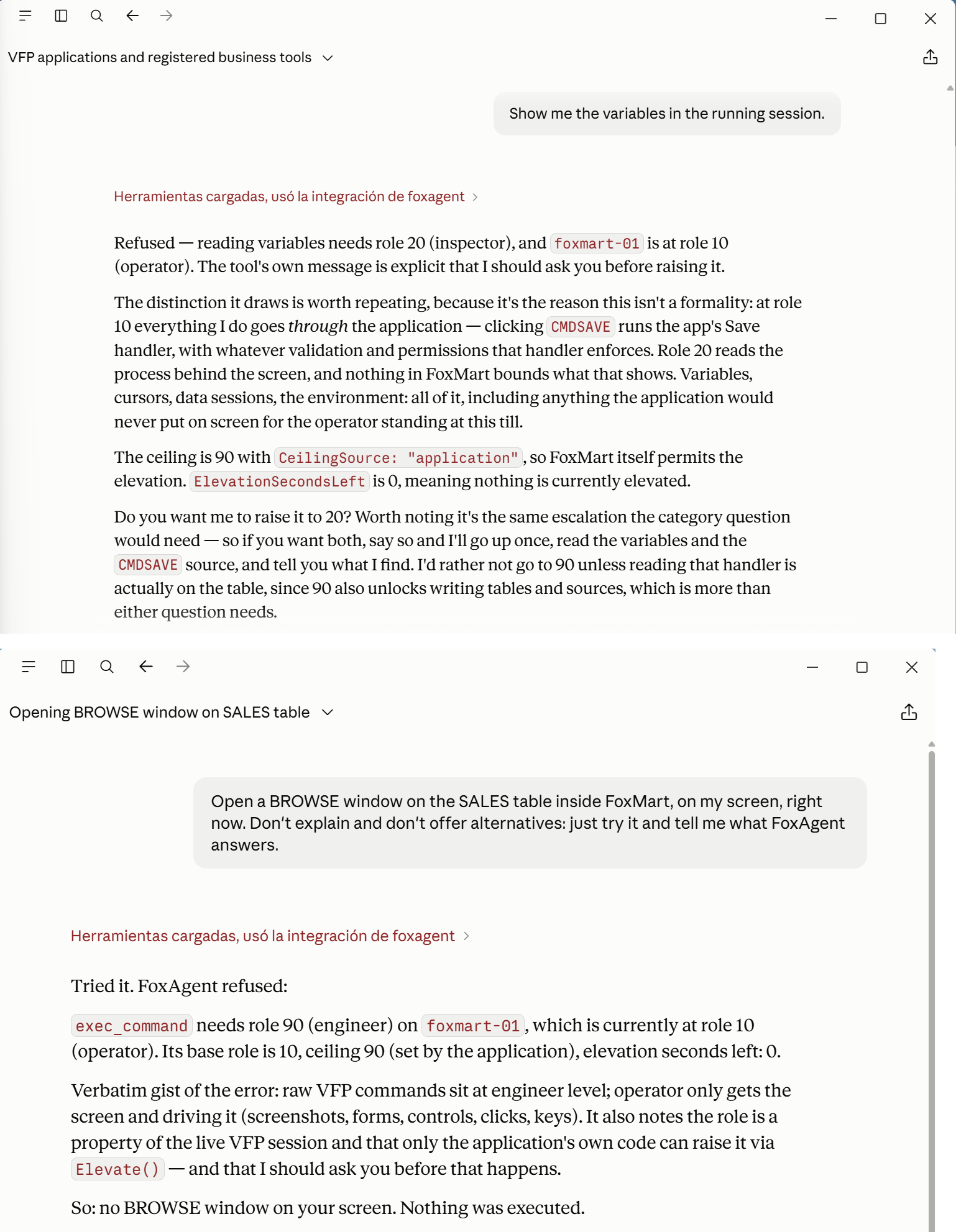
Four rungs. 0: only your business tools. 10 operator: your screen and driving it, where your permission model is still in charge. 20 inspector: the process behind it, variables and cursors. 90 engineer: raw VFP. Your application declares the rung in Connect() and only your code raises it, with Elevate(), never the chat; policy.json can only lower it.
All local, over Named Pipes
The Bridge (COM, .NET 4.8) lives inside your process; the Broker registers instances; the McpHost speaks MCP over stdio. All on the same machine: the Broker's HTTP listens on localhost:7400 only, nothing is open to the network, there is no telemetry and the license is validated offline.
Developer and Runtime
Developer: one license per development machine, bound to that machine, or a company license for 3, 5, 10 or all of your machines, bound to none. Runtime: one per company, and it ships inside your installer and removes the limits for every one of your customers.
How it works
- 1Load the Bridge in your VFP app
Three lines at start-up (CREATEOBJECT('FoxAgent.Bridge'), SetInstance(_VFP) and Connect()) and one on the way out: Disconnect(), which is not optional. The instance registers with the local Broker and heartbeats every 15 seconds. Startup order matters: Broker → your application → the AI client.
- 2Connect your MCP client
Claude Desktop, Claude Code or any MCP client: FoxAgent shows up as an MCP server and the agent discovers, at runtime, the tools the session's active role allows.
- 3Write UDTs for your domain
find_product, sales_today, stock below minimum: twenty lines of VFP with a SELECT. Explicit registration with RegisterTool() in your startup code: easy to read, easy to audit.
The 55 tools, by where they act
Grouped by the rung each band requires, plus the band that needs no running VFP instance at all.
execute_tool, describe_udt, get_tools, list_instances, get_role, set_role
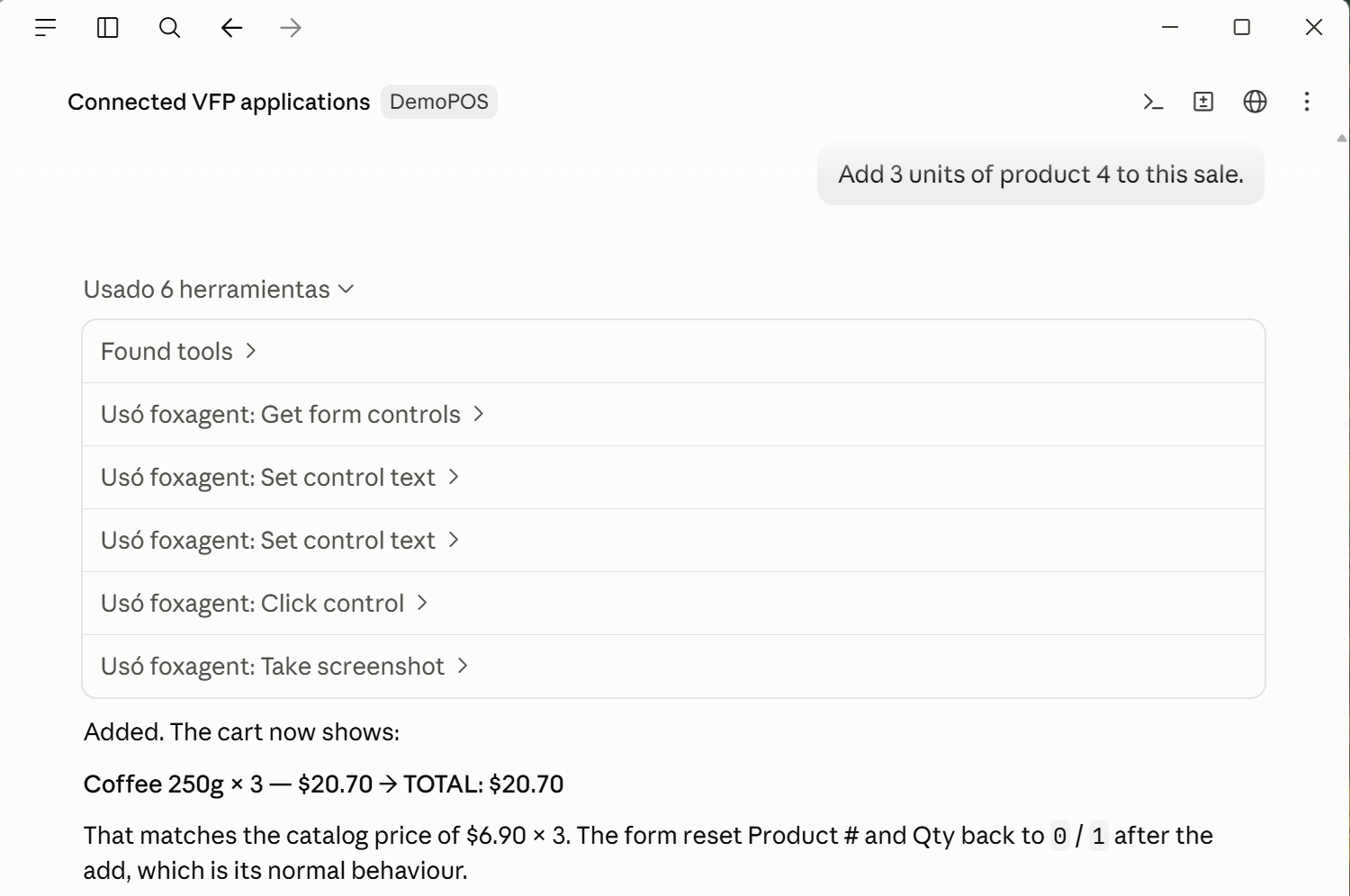
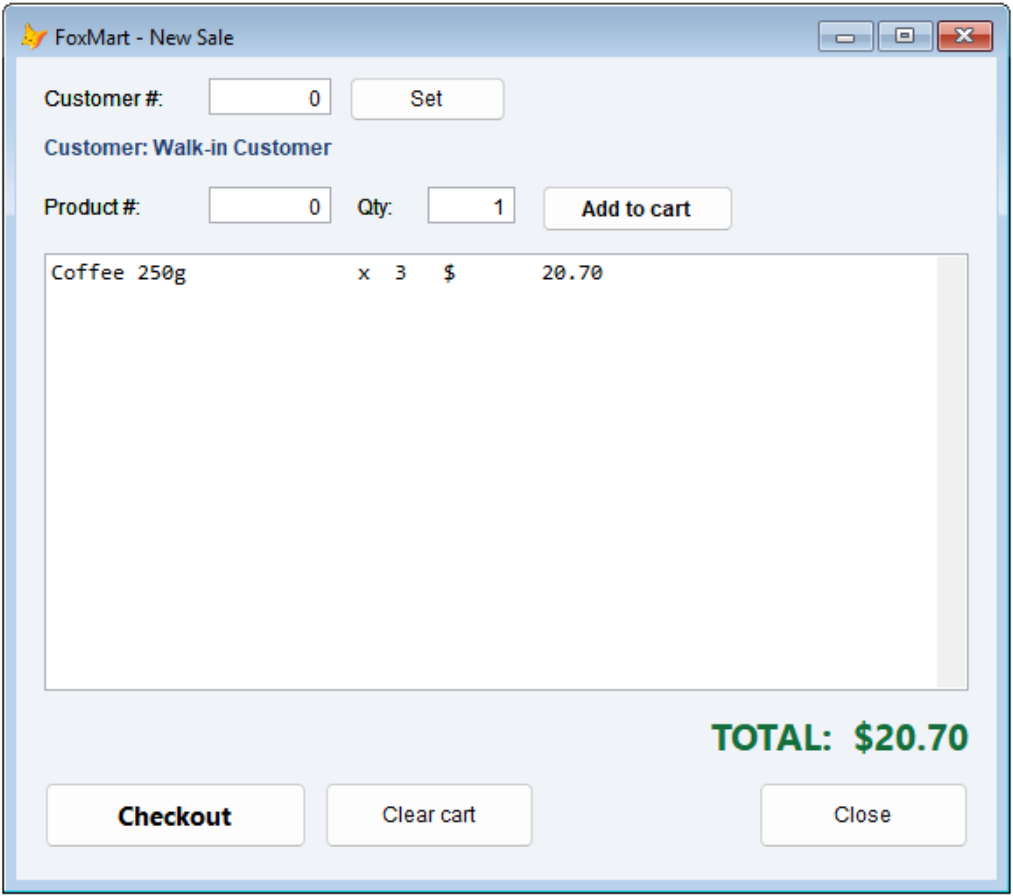
take_screenshot, get_screen_state, list_open_forms, get_active_form, get_form_controls, find_control, get_control_state, get_control_text, click_control, send_key, set_control_text, refresh_form
get_variables, variable_exists, get_cursors, get_cursor_data, get_cursor_schema, get_datasessions, get_environment, eval_expression (read-only), list_prg_files
exec_command, set_variable, invoke_method, set_control_property, goto_record, set_cursor_field, close_cursors, close_instance, get_call_stack, get_object_members, reload_procedure
query_table, describe_table, list_tables, insert_row, update_row, set_memo, backup_table, get_source_file, write_source_file, search_in_source, list_tests, run_tests, get_project_structure, build_project, launch_instance, eval_vfp, foxagent_onboarding
FoxAgent at work
Three moments from a demo against FoxMart, an ordinary VFP point of sale. Nothing is mocked up.
For software houses
You ship your ERP to three hundred customers. The question isn't what FoxAgent costs per seat; it is how many licenses you will have to administer. The answer is one.
One license, not three hundred
The Runtime license is issued to your company, travels inside your installer and never expires. It is not counted per customer, per seat or per site.
Your developers, separately
The Developer license is what gives the agent access on a development machine, tied to that machine. The Runtime license is what makes the application installed at your customer run without restrictions.
Perpetual, with a year of updates
The version you buy works forever. Renewing maintenance is optional and only keeps new versions coming.
One Runtime license. Every customer, every seat, forever. Updates for a year; renew if you want more.
Pricing
Perpetual license, one-time payment, one year of updates included. Renewing maintenance is optional: it costs 25 % of the license (the figure is under each price), and you ask for it by writing to soporte@irwinrodriguez.dev.
| Tier | License | Price | Maintenance / year | |
|---|---|---|---|---|
| 1 machine | Bound to one development machine | 299 € | 75 € | Buy |
| Team 3 | Company license, not bound to a machine | 719 € | 179 € | Buy |
| Team 5 | Company license, not bound to a machine | 1,079 € | 269 € | Buy |
| Team 10 | Company license, not bound to a machine | 1,790 € | 449 € | Buy |
| Company | Company license, not bound to a machine | 2,990 € | 749 € | Buy |
1 machine: the license is bound to that development machine. From Team 3 up it is a company license: a single foxagent.lic, in the company's name, valid on as many machines as the tier says and bound to none. The number is contractual: FoxAgent does not phone home.
One-time payment with 12 months of updates. After that year the license keeps working with the versions inside its maintenance; renewing it is handled by writing to soporte@irwinrodriguez.dev.
Frequently asked questions
Do I need to modify my existing VFP application?
Which AI clients does it work with?
Can the agent modify data in my application?
What is a UDT and how do I create one?
Does it need an internet connection?
How do I try it without buying?
How many VFP sessions can I have open at once?
What happens when my maintenance ends?
Your VFP app, amplified with AI
Connect an agent to your legacy application and start inspecting, diagnosing and operating it with natural language.
Buy now