Today I’m publishing wxForge, a free plugin for XIDE, Chris Pyrgas’s IDE for X#. It brings the tools I’ve been writing for XIDE since late 2024, which until now each had their own menu, together in one menu, Plugins > wxForge, and it connects XIDE to FoxAgent so that an AI agent can work with you inside the IDE.
Until now, writing X# with an agent meant copying the code into the chat, getting other code back and pasting it, building in XIDE and going back to the chat with the errors. The agent couldn’t see the project, and it didn’t know which file you had open.
With an agent
With FoxAgent installed, wxForge registers XIDE with the Broker when it starts, and the agent gets 41 tools for XIDE. It sees the project, its applications and files, the editor with the cursor and the selection, and the Errors and Output pads. It edits the code line by line through XIDE’s editor, so you see each change as it happens and undo it with Ctrl+Z. It builds one application or the whole project and gets back the result of each application with its errors, by file and line.
It also designs forms: it creates the form, puts controls inside their container, changes their properties, gives a button its Click handler and generates the code, as you would in the designer. It creates new applications from XIDE’s templates, with their references, their Start.prg and their dialect, and it adds and removes files and references. Whatever doesn’t have a tool of its own yet, it does from XIDE’s main menu, as the developer would.
You talk to it as usual. For example:
- Add a Windows application to my project with a customer form: name, email and a Save button that shows a message.
- Build the project and fix the errors.
- Create a console application in the FoxPro dialect that prints “Hello” and run it.
The agent comes in with role 90, the whole IDE, because the person in front of XIDE is a developer. You can lower it from the wxForge menu. Every connected XIDE counts as one instance of your FoxAgent license. If the application you’re writing is WinForms, WPF or classic VO, FoxAgent also drives it while it runs, so the agent can try out what it has just built.
Without the agent
wxForge doesn’t need FoxAgent. Without it, the FoxAgent menu says there is no connection and everything else works the same:
- Themes: 40 color themes for the editor, which with Paint the whole IDE also paint the project tree, the pads, the tabs, the toolbars and the menu bar.
- X# Evaluator: a pad to try X# code without building the project, with the same compiler XIDE uses.
- Create GUID and Generate GUID, in six formats.
- Find All References, from the right-click menu on a name.
- Favorites, Duplicate, and Clean Project or Clean Application, in the project tree.
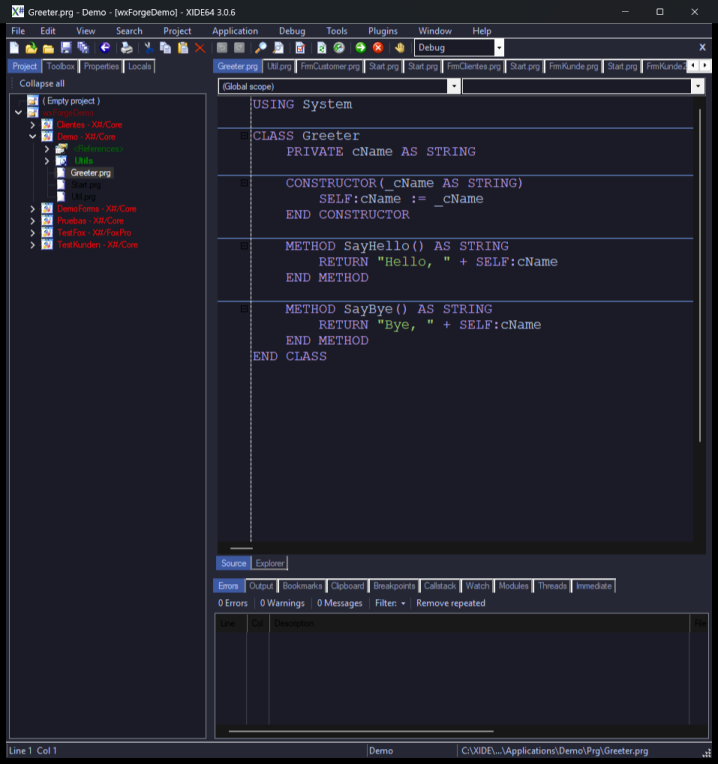
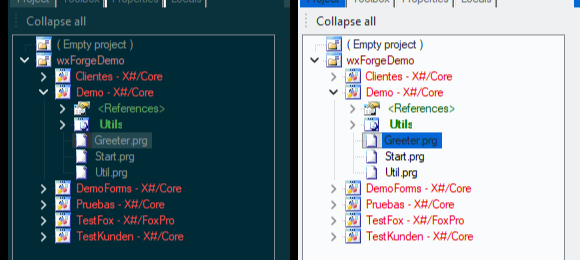
I started the themes almost a year ago, and back then they only reached the editor. Now the palette for the rest of the IDE comes from each theme’s own colors, so it works with all 40 without writing colors by hand. The project tree keeps the colors XIDE gives each kind of node (applications in red, references in green), made lighter or darker only as far as they need to be readable on the theme’s background. XIDE colors puts everything back as it was.
Installing it
wxForge is a 76 KB ZIP, with no installer and not signed. You download it from its product page:
- Before you unzip it, right-click the ZIP, Properties, check Unblock and click OK.
- Close XIDE.
- Copy the
Pluginsfolder from the ZIP into XIDE’s folder, the one withXIDE.64.exe. - Start XIDE.
Step 1 is needed because Windows blocks the files of a ZIP that comes from the internet, and if a plugin’s DLL is blocked, XIDE closes right after it starts without showing any message. If that happens to you, unblock Plugins\wxForge.dll the same way. The full guide is inside the ZIP, in English, Spanish and German.
What it doesn’t do yet
Running and debugging from XIDE, as with F5, isn’t in the plugin system, and neither is changing an application’s compiler options. The form designer and the templates work through XIDE’s own classes, tested with 3.0.6: with another version they may answer with an error, but they don’t stop XIDE. The Properties pad stays white with a dark theme, because XIDE draws it with fixed colors. I’ve told Chris about all of this, and he offered to extend the plugin system.
If you try it and something doesn’t add up, write to me.