The afternoon I lost to a clipboard
A few days ago I installed Golem on a customer’s computer so I could help him with his application. Golem is my agent for working on a remote Windows machine: you copy one executable, launch it, and whoever is being helped gets a connection line with an address and a token.
On paper it takes two minutes. That afternoon it did not.
First he had to download a zip and unpack it. This is what he found inside:
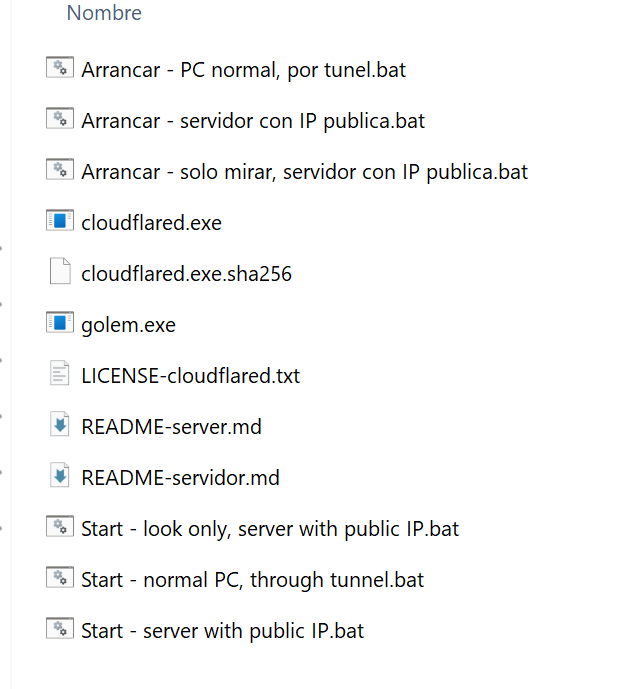
Six .bat files with similar names, in two languages, and none of them named in a way that told him which one was his. We picked one over the phone. Then it turned out that one had to be run as administrator, and explaining right click and «Run as administrator» over the phone took a while. When it finally started, the program did what it should: it printed the connection line and left it copied to the clipboard, which was the part I had been careful about so he would not have to type anything.
And there we stayed. He had the line copied and could not get it to me. The console window was in front of him, WhatsApp was on his phone, and moving something from the computer to the phone is not an obvious operation for someone who uses the computer for his accounting software and little else. We tried email. What arrived was cut off.
Whose problem it was
It is easy to tell this as a story about a clumsy customer, and that would be unfair. I had put in front of him a path with six places to go wrong: find the folder, pick the file, understand the administrator part, wait without knowing what for, locate the text and get it to me. Each of those fails rarely on its own, but together they fail nearly every time.
And at the other end of the phone there was no programmer. It was an employee at a company who uses that application every day, knows it better than I do, and has no reason to know anything about zip folders, administrator rights or moving text from a computer to a phone. If the path I give him assumes he does, the path is badly built.
So I changed the path.
One file, one button, twelve digits
Golem 1.3, which I published today, comes with a window called Assistance. The customer downloads a single file, double clicks it, and sees this:
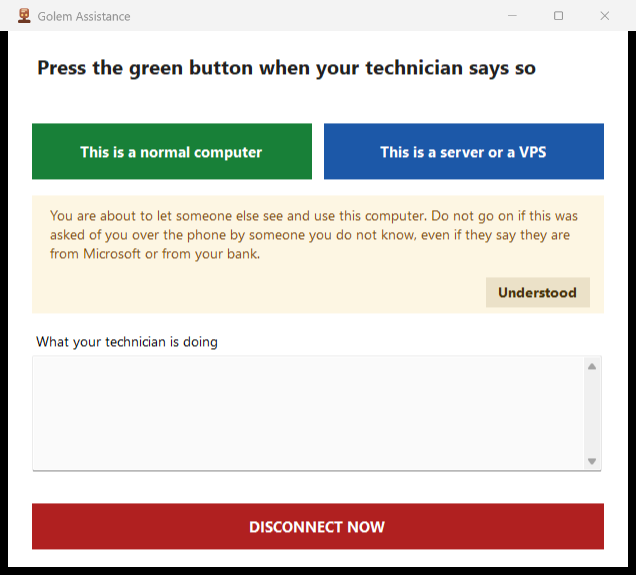
One question, two buttons and nothing else. There is no folder to unpack, no .bat to choose, no console.
That file carries the agent and the tunnel program inside it, compressed. The window puts them in place the first time it starts, in under two seconds, and on every later start it checks that they are still the same files it brought.
That check is a SHA-256, a long number that summarizes the contents of a file: change one byte and the number comes out different. The window carries the right one for each program inside itself, recalculates it over what is on disk, and compares. If it does not match, it writes its own copy again. What gets extracted there is a program that will open that computer to another person, so it is worth knowing it is the one that came out of my build and not one somebody else left on top.
When the connection is ready, the window shows twelve digits in three groups:
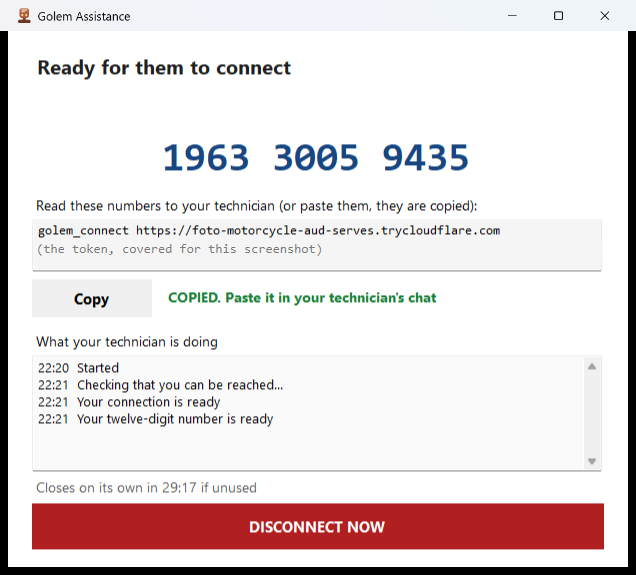
That is what the customer reads out to me on the phone. Twelve numbers, read aloud, like a code from a bank. They are also copied for him in case he can paste them, but nothing depends on that any more.
I type those twelve digits where I used to paste the long line, and I am in. Behind the scenes my Golem client swaps them for the real connection line and carries on as always.
What the number does so that this holds up
The twelve digits split into two halves with different jobs. The first four say where the appointment is stored in my portal. The next eight are the key that decrypts it, and those eight never pass through the portal.
My portal stores the connection line encrypted and cannot read it. It also stores a check derived from the key, which lets it tell whether whoever comes to collect knows that key, without knowing it itself.
Three limits sit on top of that, and all three can be verified from outside:
- The appointment lasts ten minutes.
- It works once. The moment I collect it, it stops existing.
- After five failed attempts the slot is burned and not even the right number gets in.
Somebody typing random numbers can, at most, fill slots with rubbish for ten minutes.
What I did not change
The usual long line is still there, below the number, in the same window. If my portal does not answer, the program says so in plain words and shows the line, and I use it the way I have used it from the start. The number is a convenience on top of what already worked.
The console kit has not been touched either. For a VPS or a server I administer myself, I still copy the executable and launch it from its .bat, which is what it was built for. The window is for the other situation: somebody on the phone who needs help now and has no reason to know any of this.
The warning that goes above the button
There is one thing I do not like about having made this so easy, and I would rather say it. A one click program that opens your computer to another person is, step by step, the script of the tech support scam. The easier I make it for my customer, the easier I make it for whoever calls him tomorrow claiming to be from his bank.
That is why the download page carries the warning above the button, not in small print at the bottom: you only do this if you made the call, or if you know who is at the other end. And while the connection lasts, the window always keeps a red button in sight that cuts it instantly, with no «are you sure». A defense that asks for confirmation is worth nothing when the person is frightened.
Where it is
The page is irwinrodriguez.dev/asistencia, in Spanish, English and German. It downloads without an account and without a license: somebody asking for help has no reason to be a customer of mine.
There are two versions. The loose one, for somebody who will use it once and does not want to install anything, and one that installs and leaves a desktop shortcut, for somebody who will call me more often. That second one asks a single question about what kind of computer this is, on the day it is installed and with me on the phone, and never asks again.
Both are signed with my certificate, so Windows does not show the blue unknown application screen. That warning was another wall, and one of the kind that makes people hang up.