Free
FoxPack
Libraries for your Visual FoxPro projects, at a fixed version.
Type foxpack add jsonfox and the library lands in lib\jsonfox\ of your project. FoxPack records the exact commit and the SHA-256 of every file in foxpack.lock. Commit both to git, and anyone who clones the project gets the same files with foxpack restore.
for Windows · no account needed · 6.7 MB · v0.1.4
In your project folder
foxpack add jsonfox
foxpack list
foxpack verify
The commands
- foxpack add jsonfox
- Installs the latest version of a library from the index.
- foxpack add jsonfox@13.1
- Installs a given version.
- foxpack add github:usuario/repo
- Installs a library that is not in the index. It asks first.
- foxpack restore
- Downloads exactly what foxpack.lock says. For a fresh clone.
- foxpack update
- Moves one library, or all of them, to the latest version.
- foxpack remove jsonfox
- Removes it from lib\, from foxpack.lock and from the .pjx if it is closed.
- foxpack verify
- Checks that nobody has edited the copies in lib\.
Every command works on the current folder, or on the one given with -p. foxpack <command> --help explains each one.
The rules
- A library's copy is never edited. The fix goes to its repository and comes back with foxpack update. verify and update notice when somebody has changed it.
- Fixed versions. A version is a tag of the library's repository, and foxpack.lock keeps its commit: a tag can move, a commit cannot.
- Files as they come. A CP1252 .prg is saved exactly as it was published, accents included. FoxPack also writes lib\.gitattributes so git leaves line endings alone.
- All or nothing. The library is downloaded to a temporary folder and only replaces the old one once every file has arrived.
- Nothing runs. Installing a library copies files. No code from the library runs when you install it.
Two libraries for your forms
FoxStyleSheet and VFPStretch are in the index and are open source (MIT). Each one is a single .prg with no dependencies, and the examples\showcase sample of FoxStyleSheet uses both.
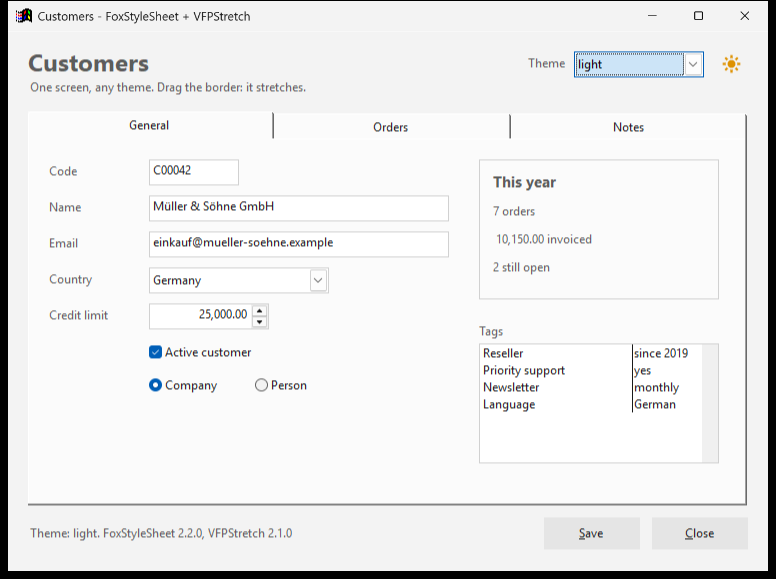
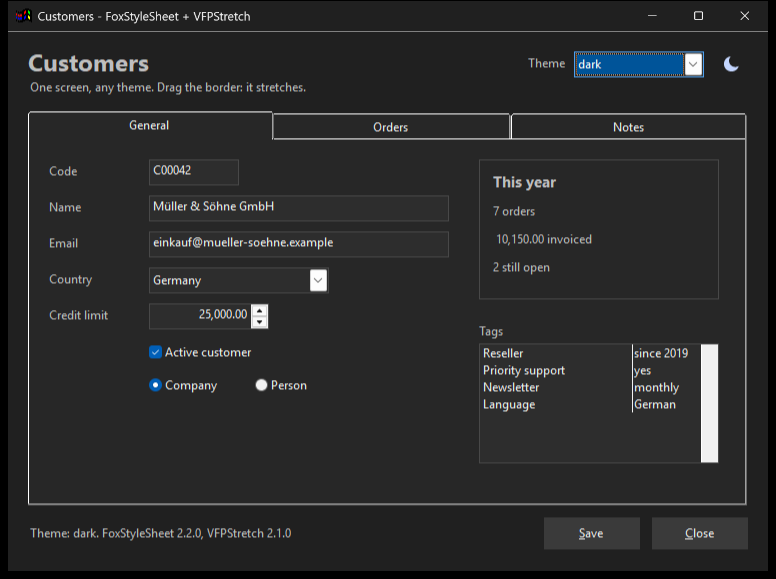
The same form with the light and the dark theme.
FoxStyleSheet 2.2.0
Style sheets for VFP 9 forms. A theme written like CSS sets the colours, fonts and behaviour of every control of a form without touching the form: by base class, by your own class, by name and on events such as focus. It comes with 16 themes, among them a light and a dark one that the user switches with a sun and moon button.
foxpack add foxstylesheetVFPStretch 2.1.0
Resizes every control of a form when the window changes size: position, size, font, grid rows and list columns. It can also open the forms of an application at a zoom the user chooses once. Version 2.1.0 fixes a bug from 2024 that opened forms at 25 % of their size.
foxpack add vfpstretchWith FoxForge
In FoxForge (0.3.22 or later), FoxForge > Current project > Add library… runs foxpack add, and building with Ctrl+F7 puts the files of foxpack.lock in the project and takes out the ones it no longer lists.
With an agent, if you want
You do not need FoxStack to use FoxPack. FoxStack is what puts its commands in front of an agent. The installer also puts FoxStack, our local MCP server, on the machine if it is missing or older, and registers FoxPack in it. An agent such as Claude, with a single foxstack entry in its configuration, gets the FoxPack commands as tools: foxpack_add, foxpack_restore, foxpack_update, foxpack_remove, foxpack_list and foxpack_verify. If it detects Claude Desktop, Cursor or OpenCode, the installer offers to write that entry. To do it later, or in Claude Code (in your project folder):
foxstack setup claude-desktop
foxstack setup claude-code
FoxStack needs the 32-bit .NET 10 runtime, and its installer offers it when it is missing. From the console, FoxPack works without it.
Want Claude to manage your libraries through a single MCP entry? Meet FoxStack →
Publishing a library
Put a foxpack.json in the root of your repository and tag that commit with the same version (v1.0). From then on anyone can install it with foxpack add github:your-user/mylib. To have it installed by name, add it to the index.
{
  "name": "mylib",
  "version": "1.0",
  "description": "What it does",
  "license": "MIT",
  "files": ["MyLib.prg"],
  "usage": "loLib = NEWOBJECT(\"MyLib\", \"MyLib.prg\")"
}Built with FoxCli
FoxPack is written in Visual FoxPro and built with FoxCli: a console application like any other, with its help, typed options, exit codes and JSON output. Its source code is the example.
What it needs
Windows 10 or 11. You do not need Visual FoxPro installed to run it: the runtime travels with FoxPack. The installer puts it in C:\Programas\FoxPack and on the PATH, so it works from any console.
The file, in case you want to check it
- Digitally signed by:
- Irwin Alfredo Rodriguez Gimenez
- Version:
- 0.1.4
- Installer · 6.7 MB · SHA-256
- 7FA293E6F039F4A5BD2EE77BF3B16BDEB057755C82F5B0B931F3CF09FB108797
If something does not add up, write to me: soporte@irwinrodriguez.dev