We have all seen this. The user clicks «Close the month», or «Issue the invoices», or «Generate the PDFs», and the application goes still. The window turns blank when another one passes over it, the mouse does nothing, and Windows writes «not responding» in the title bar. The job is running fine, but from the outside there is no way to tell, and the user ends up phoning to ask whether they should turn the computer off.
It happens because Visual FoxPro does one thing at a time. While it walks your 180,000 delivery-note lines, it cannot repaint the screen or attend to the mouse. We have worked around it for years with DOEVENTS inside the loop, with a second .exe launched by RUN /N that leaves a flag file when it finishes, or by pushing the job to the night with a scheduled task.
FoxCore is the library I wrote to solve that another way: you hand the work to other processes, which get on with it while your application stays alive. And since there are several of them, it takes less time.
What it does, in one sentence
FoxCore starts separate copies of Visual FoxPro, sends them your code exactly as it is written, and gives you back the result.
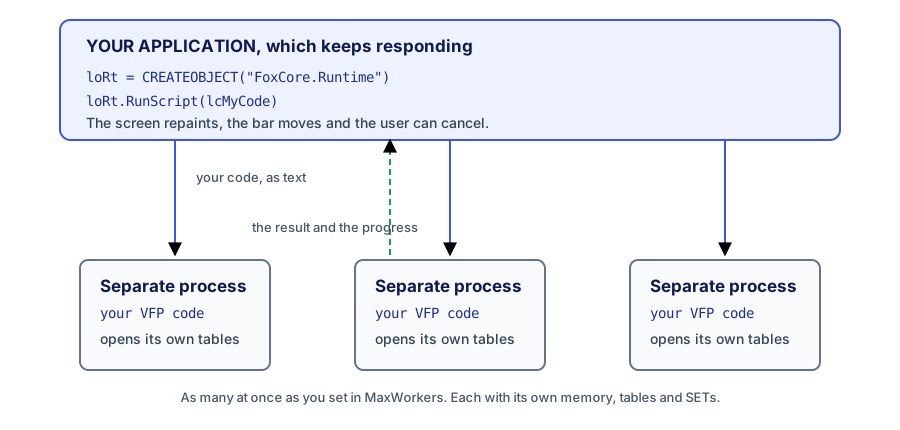
What matters in that drawing for someone who has been writing FoxPro for years: the code running in there is ordinary FoxPro. Nothing to rewrite in another language, no threads to learn, no service to set up. It is the same SCAN ... ENDSCAN you already have, inside a different process.
And for someone who inherited a FoxPro system and comes from today’s world: there is no multithreading here, because VFP does not have it. What there is, is parallelism across operating system processes, coordinated from your main process.
The least you have to write
LOCAL loRt, lcId

loRt = CREATEOBJECT("FoxCore.Runtime")
loRt.Activate(lcMyLicense)                  && the license, as a string
loRt.Attach(_VFP)                           && hooks the engine to your program
loRt.MaxWorkers = 4                         && four processes at most

lcId = loRt.RunScript("RETURN 2 + 2", "the first one")

DO WHILE !loRt.IsCompleted(lcId)
    loRt.Pump()                             && without this nothing arrives
ENDDO

? loRt.GetState(lcId), loRt.GetResult(lcId) && Completed   4

loRt.Shutdown()
RunScript() takes a string with your code and returns an identifier. By the time the call returns, the task is already running out there. The result is whatever your code hands back with RETURN.
The three things to understand
If you only keep one piece of this article, keep this one.
1. The working process sees nothing of yours. It is born clean: no variables of yours (not even the PUBLIC ones), no open tables, no cursors, no SET DEFAULT, no data session. It opens whatever it needs itself. What looks like a drawback is the best thing about it, because a task that blows up cannot spoil your session, and eight tasks at once do not step on each other. Code that works pasted into the Command Window can fail as a task, and almost always for this reason: there it was inheriting your environment.
2. Pump() is what lets the notices through. VFP does one thing at a time, for receiving too. The engine never walks into your program on its own: it queues up and waits for you to give way, and Pump() is that way. Without it, neither results nor progress arrive. In a form, Pump() goes inside a Timer; in an unattended job, inside the waiting loop.
3. Shutdown() closes the processes. If you never call it, processes stay open that nobody sees, eating the workstation’s memory. It goes at the end, on the error path, and in the form’s Destroy.
What you can do with this in a business application
What follows are jobs that fit well, and the reason why they fit.
Invoicing, recalculations, month-end closes. Three hundred invoices spread over four or eight processes. Each task opens the tables it needs in SHARED, does its part and returns the result. The user watches the bar move and can stop it.
Generating documents. PDF, Excel, .frx reports to file. Each document is independent of the previous one, so they split up without much thought.
Importing and exporting large files. One chunk per task. The one that fails leaves its error written down and the rest carry on.
Calls to web services, to the tax authority, to a bank. Here the time goes on waiting for an answer. Waiting inside another process costs your screen nothing, and with eight tasks you get eight waits at once.
The night job you also want to be able to launch during the day. The same code serves both, because it is plain FoxPro text.
How you pass it data and how it tells you where it is
Since the working process sees nothing of yours, there are three ways to give it what it needs, from the smallest up: concatenate it into the text of the code itself, leave it on a noticeboard it reads, or leave it in a DBF it opens. The noticeboard is the one most used for configuration, paths, the accounting year or the user who logged in.
* in your application
loRt.Publish("year", 2026)

* inside the code running apart
*     RETURN 'year ' + TRANSFORM(runtime.GetValue('year'))
That runtime variable is put into every task by the engine, and it is the only door back to you. With it, the working code tells you how it is doing, writes to your log and asks whether you have told it to stop:
* inside the code running apart
runtime.Progress(i * 20, 'document ' + TRANSFORM(i) + ' of 5')
runtime.Log('info', 'finished with nothing to report')

IF runtime.IsCancelled()
    EXIT
ENDIF
On your side you pick it up by asking (GetProgress) or by registering an object of yours that the engine calls. And since those calls reach you inside your Pump(), that is, on your own thread, that object can move a bar, write into a cursor or repaint with no special care. To stop a task you have Cancel(), which waits for the code to ask, and Kill(), which closes the process outright when the code asks nothing.
The invoice number, with no locking
This is the most asked question, and where the design becomes clear. If eight processes issue invoices at the same time, who hands out the consecutive number? The answer is that your application keeps handing it out, and the task asks for it:
DEFINE CLASS InvoiceCounter AS Custom

    nLast = 0

    FUNCTION NextNumber(tcSeries)
        THIS.nLast = THIS.nLast + 1
        RETURN TRANSFORM(tcSeries) + "-" + PADL(THIS.nLast, 4, "0")
    ENDFUNC

ENDDEFINELOCAL loCounter
* in your application, before launching the tasks
loCounter = CREATEOBJECT("InvoiceCounter")
loRt.RegisterHandler("NextInvoiceNumber", loCounter, "NextNumber")
* and in the code running apart, where the numbering belongs
* lcNumber = runtime.Call('NextInvoiceNumber', 'INV')
* RETURN lcNumberNot one repeated number and not one FLOCK(). Those calls are served in your process, inside Pump(), one at a time, so there are never two at once and there is nothing to lock.
What your machine needs, and what the client’s needs
Here is the serious question, and it helps to explain first how the thing works underneath.
Windows keeps a sort of notebook where it writes down which program answers to each name. When your code runs CREATEOBJECT("Word.Application"), Windows looks in that notebook, sees which executable serves that name and starts it. Writing something into that notebook is what we call registering, and it is what installers do.
FoxCore uses that notebook twice. Once for the engine, which is a .dll registered when you install it. And once for the processes that do the work, because they are started by their name in the notebook too. The name it uses out of the box is Visual FoxPro 9’s:
loRt.WorkerProgId = "VisualFoxpro.Application.9"That works on your machine, where you have VFP installed. On a client workstation it does not exist and cannot exist, because vfp9.exe is Microsoft’s complete product and cannot be redistributed. That is why, since version 3.1.0, you can change that name for your own executable:
loRt.WorkerProgId = "VisualFoxpro.Application.a"    && VFP Advanced 10.x
loRt.WorkerProgId = "MyErp.Server"                  && your EXE, on the client workstation
The good news is that you almost certainly have nothing new to ship: it can be the very .exe of your application, with one more class inside. Your executable already carries the VFP runtime, which can be redistributed, and it starts with your environment already set up, so it is even faster than a bare FoxPro.
This is what travels to the client workstation:
| What | What to do with it |
|---|---|
FoxCore.Runtime.dll and Nexum.dll | copied along with your application, and the first one registered; there is an installer that does it |
your usual .exe | you already ship it; register it with your.exe /regserver |
| the license | it lives inside your code, as a string. There is no file to copy |
Both registrations ask for administrator rights, and that changes nothing for you: your installer already asks for them. What does not work on a workstation is registering «for this user only»: there are Windows processes that do not see that registration, and then you get «Class not registered» even though everything works on your machine.
What your executable needs in order to act as a helper
Four things, and none of them is long. You have them all in the template that comes with the package.
An OLEPUBLIC class in your project. The file name and the class name form the name in the notebook: myapp.exe with the class MyWorker gives myapp.MyWorker.
Three methods written by hand in that class. They are the ones FoxCore uses to talk to it, and they have to be written because VFP’s Application object does not cross out of the process.
The environment set up in that class’s Init(). When Windows starts your .exe from the notebook, the main program does not run. If you set up your SET PATH, your classes and your connection there, the helper is born empty and nobody tells you.
An ON ERROR on the first line of Init(), depending on no variable. That process has no window: an unhandled error opens a dialog nobody can close and the process hangs there. Measured against a real executable, that is 3.465 s per task with the dialog against 0.131 s without it. And the handler has to lean on functions only, because a CLEAR ALL destroys the variables before anything fails.
Here is the whole class, which is what you copy into your project and compile with it:
DEFINE CLASS MyWorker AS Custom OLEPUBLIC

    *-- Here, and only here, the environment is set up: the EXE's main
    *-- program does not run when Windows starts it by its name.
    FUNCTION Init
        *-- First of all, and using no variables: a CLEAR ALL destroys
        *-- them before anything fails and the handler itself would blow up.
        ON ERROR STRTOFILE("ERR " + TRANSFORM(ERROR()) + ": " + MESSAGE() + ;
            CHR(13) + CHR(10), ADDBS(SYS(2023)) + "myworker-errors.log", 1)

        THIS.PrepareEnvironment()
        RETURN .T.
    ENDFUNC

    *-- Your environment: what your code needs to work without your form.
    *-- To know where you are, _VFP.ServerName (SYS(16) and SYS(2004) are
    *-- no good inside an EXE started through COM).
    PROCEDURE PrepareEnvironment
        LOCAL lcBase
        lcBase = ADDBS(JUSTPATH(_VFP.ServerName))

        SET TALK OFF
        SET SAFETY OFF
        SET EXCLUSIVE OFF
        SET DELETED ON

        SET DEFAULT TO (lcBase)
        SET PATH TO (lcBase + "libs") ADDITIVE
        * SET CLASSLIB TO (lcBase + "libs\engine.vcx") ADDITIVE
        * SET PROCEDURE TO (lcBase + "libs\functions.fxp") ADDITIVE
    ENDPROC

    *-- The three methods FoxCore uses to talk to the helper.
    *-- They have to be written: they are not inherited.
    FUNCTION DoCmd(tcCommand)
        IF VARTYPE(tcCommand) <> "C" OR EMPTY(tcCommand)
            RETURN .F.
        ENDIF
        EXECSCRIPT(tcCommand)
        RETURN .T.
    ENDFUNC

    FUNCTION SetVar(tcName, tuValue)
        LOCAL lcName
        IF VARTYPE(tcName) <> "C" OR EMPTY(tcName)
            RETURN .F.
        ENDIF
        lcName = ALLTRIM(tcName)
        IF TYPE(lcName) = "U"
            PUBLIC &lcName
        ENDIF
        STORE tuValue TO (lcName)
        RETURN .T.
    ENDFUNC

    FUNCTION Eval(tcExpression)
        IF VARTYPE(tcExpression) <> "C" OR EMPTY(tcExpression)
            RETURN .NULL.
        ENDIF
        RETURN EVALUATE(tcExpression)
    ENDFUNC

ENDDEFINE
It compiles the way it always compiles, and it is registered once:
BUILD EXE myapp FROM myapp
myapp.exe /regserver
There is one more that costs an afternoon if you do not know it: VFP generates a new identifier for the class on every compilation, and then you have to register again. It is switched off in the «Regenerate Component IDs» box of the build dialog, or with the fifth argument of Project.Build().
Before integrating anything, there is one command that checks it by starting your executable and running a test snippet in it, and that tells you how long it takes to be ready:
? loRt.ProbeWorker("MyErp.Server")When starting up costs more than the work
Starting a process has a price. A bare FoxPro takes about a tenth of a second to be ready; an executable that sets up an ERP’s environment with its connection open can go over a second. That is the fixed cost of each task, and the practical rule comes out of it: a task of two tenths of a second does not pay off, because starting up costs more than the work. Split by document, by customer or by table range, not by line.
If your environment takes a while to set up, the processes can stay for the next task:
loRt.MaxTasksPerWorker = 25                   && out of the box it is 1
loRt.WorkerInitScript  = lcSetUpEnvironment   && once per process
loRt.WorkerResetScript = "CLOSE DATABASES"    && between one task and the next
In the load test suite, 120 tasks over eight processes went from 11.0 s and 120 startups to 3.3 s and 11 startups, changing only that property. The software house that certified this version in August 2026, with its whole ERP set up inside the helper, measured an improvement of 3.2 times.
What it costs: a reused process carries over what the previous task left, that is, its PUBLIC variables, its open tables and its SETs. That is what keeps the environment in place, and it is why FoxCore cleans nothing on its own. Whatever has to be closed between tasks you write yourself in WorkerResetScript. If you would rather not think about this, leave the property at 1 and every task gets a clean process.
When it does not pay off
This has to be said as plainly as the rest.
- FoxCore does not speed up your code. It moves it out of the way, which is a different thing. A 40 s job still takes 40 s; what changes is that the application does not go dead and that eight of them fit into the same stretch.
- If the query is slow for want of an index, it will stay slow.
- Each process takes real memory and CPU. Four or eight on a normal workstation, not forty.
- The result comes back as a simple value: character, numeric, logical, date. A VFP object does not cross well, so write it to disk and return the path.
What you do not have to learn
No .NET, no threads, no Windows services and no command line. What you write is FoxPro, and the only new part is half a dozen calls: RunScript, Pump, IsCompleted, GetResult, Cancel and Shutdown. The rest of the surface is there for when you need it.
The figures in this article come from the load test suite and from the two certifications carried out in August 2026 by a software house with its real ERP, 47 projects in production in agricultural cooperatives: a ceiling of 6.1 tasks per second with minimal tasks, 5.97 times faster with eight processes on 2 s tasks, and not one orphan process left at the end.
Where to start
The package brings a demo you run with DO Demo, an eight-step guide where each step fits in twenty lines and can be run on its own, a recipe book with four complete cases (a table in parallel, a form with a bar and a stop button, a night job, and your own executable for the client workstation) and twelve short examples. Installation is in the portal documentation, and the quick start in the quickstart.
If your code says CREATEOBJECT("FoxCore.FoxCoreClass"), that is the earlier engine, which still exists and is still supported. This article is about the 3.x line, CREATEOBJECT("FoxCore.Runtime"), and the table mapping one to the other is at the end of the reference.